
Single-Item vs Multi-Item Orders: Where Your Shipping Savings Actually Hide
Ask a room of 3PL managers which orders waste the most shipping money, the simple ones or the complicated ones, and most will say the complicated ones.
They are right, but usually for the wrong reason. Multi-item orders aren't expensive because they are big. They are expensive because a person has to solve a 3D puzzle in a few seconds, and when they aren't sure the items will fit, they reach for the bigger box. Nobody gets told off for a box that closes.
This guide splits your order book in two, shows why the savings gather in one half of it, and gives you a simple way to find out how much of your own volume sits there.
Two Kinds of Order, Two Different Problems
Every order in your warehouse falls into one of two groups, and they go wrong in different ways:
- Single-item orders have a box problem. One product, one box. The question isn't "how do we pack this?" but "do we stock a box that fits it closely?" If the product's dimensions are right and the suite has a close-fitting carton, the answer is the same every time.
- Multi-item orders have a packing problem. Now the question is "which box, and how do these items go in it?" The answer changes with every combination of products, quantities and orientations, so it has to be worked out again for every new mix.
To be fair to the single-item side: its waste is real. If the nearest box in your range is two sizes too big for a best-selling product, every one of those orders pays for it. But the fix is a one-off. Buy the right carton, update the SKU's dimensions, and the problem is solved for good. (Our five-step box suite audit covers exactly that.)
Multi-item waste doesn't work like that. It comes back on every order, because the puzzle is new on every order.
Why Multi-Item Orders Defeat Even Good Packers
Here is the arithmetic. A rectangular item can sit in a box six ways: any of its three faces down, turned one of two ways. With three items, that gives 6 × 6 × 6 = 216 combinations of orientations, and 3 × 2 × 1 = 6 orders to place them in: 1,296 sequences before you have decided where anything actually goes.
With six items, it is 66 = 46,656 orientation combinations times 720 placement orders: 33,592,320 sequences. Then do it again for every box size on the shelf.
Nobody on a pack bench works through that, and nobody should have to. Experienced packers use rules of thumb, and good ones are very good at it. But under quota pressure the safest rule of thumb is "pick the box I know will close", and that is how air gets into the parcel. When DS Smith measured 190 e-commerce packs, it found that, on average, about 43% of each box was empty space, from 18% for clothing and footwear to 64% for glassware (The Empty Space Economy, Forbes Insights in association with DS Smith, 2018).
Hardware doesn't make the puzzle go away either. In a TCS-i simulation of 100 multi-item orders, 3D cartonization software choosing from 7 standard box sizes was compared with an on-the-fly custom box machine. The software produced a smaller box in 65% of orders, with 8.4% less total shipped volume, 20.1% less void space and 8.9% less cardboard. The reason is what we call the Tallest Item Trap: the machine wraps the whole footprint at the height of the tallest item, so a short item sitting next to a tall one drags air into the parcel. In fairness, custom box machines are excellent for single items and apparel. It is the multi-item mix that trips them up.
Let's Do the Maths
One order
Take a three-item order: a stoneware mug, a large soy candle and a T-shirt. Packed carefully, with padding around the two fragile items and the tee rolled along the side, it fits a 30 × 20 × 15 cm box: 9,000 cm³.
Now picture a packer who isn't sure the mug and candle will fit with their padding, and reaches for the next size up. Say that is 35 × 25 × 20 cm: 17,500 cm³. The box sizes here are illustrative, but the effect is typical:
- 17,500 ÷ 9,000 = 1.94, so the bigger box ships almost twice the volume.
- Put the other way round, the right box is 8,500 ÷ 17,500 = 48.6% smaller.
- Carriers work out dimensional weight as length × width × height divided by a divisor, so whatever divisor your contract uses, the DIM weight falls by the same proportion (before each carrier's rounding rules).
That last point only bites when DIM weight is higher than the actual weight, which is exactly the case for light, bulky goods like candles and tees. (For how DIM pricing works on the floor, see Stop Shipping Air.)
The whole order book
Now scale up. Where a smaller box fits, TCS-i saves $2.10–$3.40 per multi-item order. Two examples: a multi-item cosmetics order moving from Box 10 to Box 4B saves 4 lbs of DIM weight and $3.40; a supplements-and-accessories order moving from Box 14 to Box 6 saves 3 lbs and $2.10. Meanwhile a single-item skincare order in Box 8 stays in Box 8 and saves $0.00, because it was already in the right box.
Averaged across every order, single items included, the saving is about $0.35 per order. That gap tells you something: plenty of orders are already in the right box, which is why the average across all orders is about $0.35, not $3. Most orders are already fine. The money is concentrated in a minority of them, and you won't see it in an average.
The small average still adds up: at 1,000 orders a day, roughly $350 a day. In our UK 3PL live pilot, 36,000 live orders (June–September 2026, multi-brand e-commerce, on ShipHero) saved about $0.35 per order on carrier rate cards, roughly $12,600 over the pilot, and the shipping saved was about 10× the TCS-i fee at list price. Those are rate-card savings, not yet reconciled to carrier invoices, and plenty of orders didn't change at all. The multi-item orders did the work.
How to Find the Multi-Item Money in Your Own Orders
You don't need new software to size the opportunity. You need a few exports from your WMS and an afternoon:
- Split the last 90 days by item count. One item, two items, three or more. The share of multi-item orders is the first number that tells you how big the prize could be.
- Check single items against your box suite. Compare each best-seller's dimensions (plus your clearance) with the box it actually ships in. A consistent mismatch is a box-buying problem, not a packing problem.
- Rank multi-item combinations by frequency. Bundles, gift sets and subscription boxes repeat. Work out the right box and layout for each one once and send it to the bench every time (more on that in 30 Clients, 30 Rulebooks). If your clients run gift sets over peak, start there.
- Fix SKU dimensions first. Missing or wrong product dimensions make every box calculation wrong, by hand or by software.
- Compare the smallest possible box with the box used. Across your multi-item orders, that gap, priced on your own rate card, is your real number.
Every warehouse has a different order mix, so an industry average is a poor guide to yours. Your own orders are the only honest answer.
Where TCS-i Fits
The TCS-i Cartonization Control Hub handles both halves of the order book. It sits on top of your existing WMS, with 1-click integration for ShipHero, Mintsoft, Extensiv and Logiwa, or webhooks and a REST API for other systems, so there is no new hardware and no database migration.
For single items, it confirms the smallest box that fits and flags the SKUs whose dimensions can't be trusted. For multi-item orders, the engine solves the 3D puzzle in under 200ms when the order is scanned, and the pack-station screen shows the box first, then each product by name in a step-by-step 3D guide, with padding drawn around anything fragile.
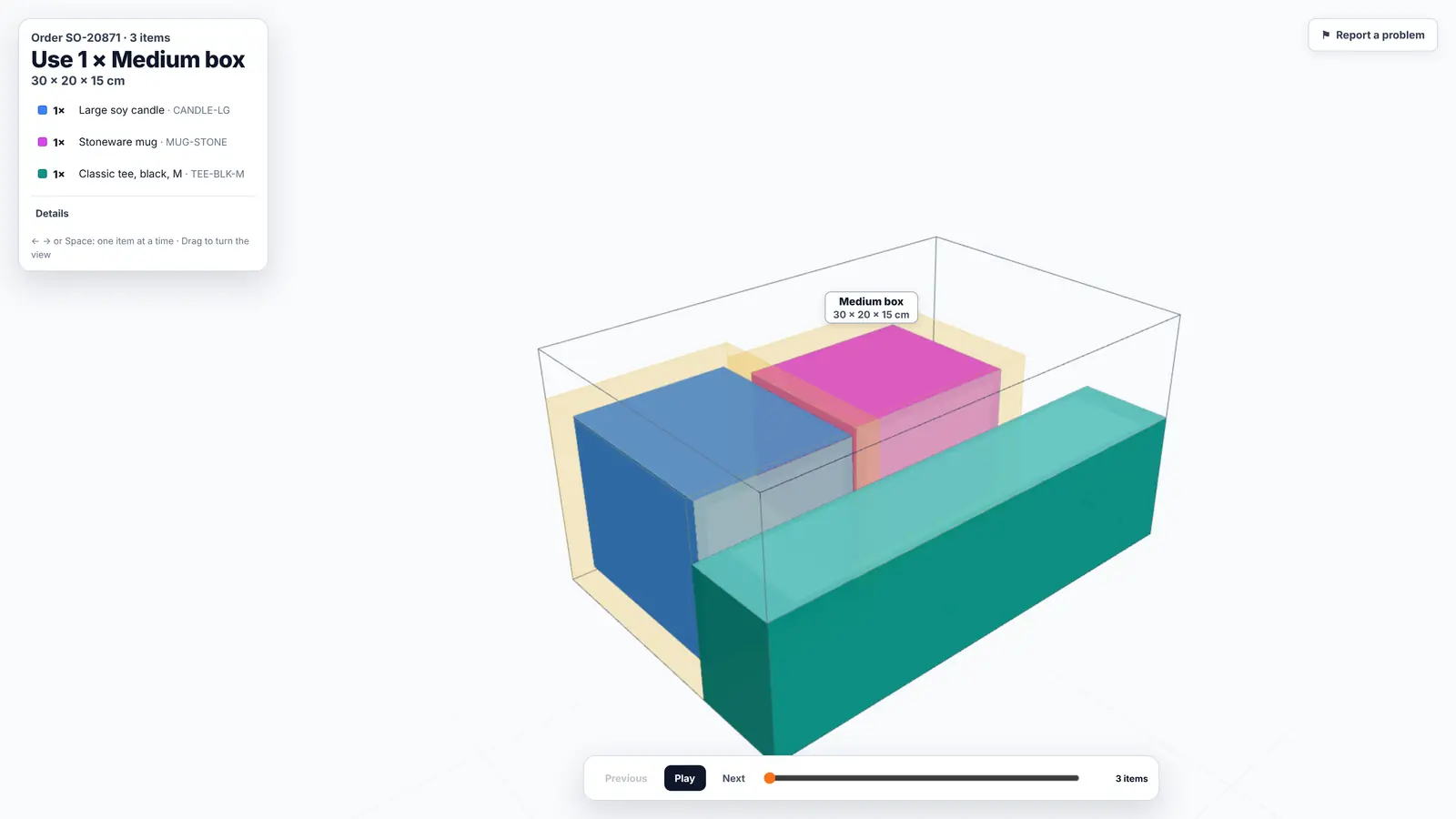
The TCS-i packer screen for a three-item order (demo data): the box comes first, then each product by name, with the 3D layout and padding around the mug and candle.
Repeat bundles can be solved once and stored as a packing rule, so the same combination gets the same box and layout every time. Because packers stop testing boxes and rearranging items, step-by-step 3D guidance also improves packs per hour by about 20%.
You can start on the Free Health Monitor plan, which connects your WMS and audits live volumetric waste at no cost; the 3D prompts at the pack station come with the paid Active 3D Bridge.
The Bottom Line
- Single-item orders have a box problem: fix it once by stocking the right cartons and cleaning SKU data.
- Multi-item orders have a packing problem that comes back on every order, which is why that is where the waste and the savings concentrate.
- Expect $2.10–$3.40 per multi-item order where a smaller box fits, and about $0.35 averaged across all orders. Keep them apart: only quote $2.10–$3.40 against multi-item order volumes.
- Split your own order book by item count before trusting anyone's average, including ours.
The simple orders mostly look after themselves. The money is in the three-item order a tired packer is about to put in the bigger box, and it has to be won before tape touches the box.
Find the multi-item money in your orders
Run the free packaging audit on your own WMS exports (no account, about three minutes), or book a demo and we'll show your multi-item orders on a pack-station screen.